rayomd
Markdown to PDF in under a millisecond: one small native binary, no browser, LaTeX or Pandoc.
INSTALLATION
$ curl -LO https://github.com/Butterski/rayomd/releases/download/v5.2.5/rayomd-5.2.5-linux-x64-static.tar.gz && tar -xzf rayomd-5.2.5-linux-x64-static.tar.gz$ Invoke-WebRequest https://github.com/Butterski/rayomd/releases/download/v5.2.5/rayomd-5.2.5-windows-x64.zip -OutFile rayomd.zip; Expand-Archive rayomd.zip$ https://github.com/Butterski/rayomd/releases/latest$ git clone https://github.com/Butterski/rayomd && cd rayomd && cmake -S . -B build -DCMAKE_BUILD_TYPE=Release && cmake --build build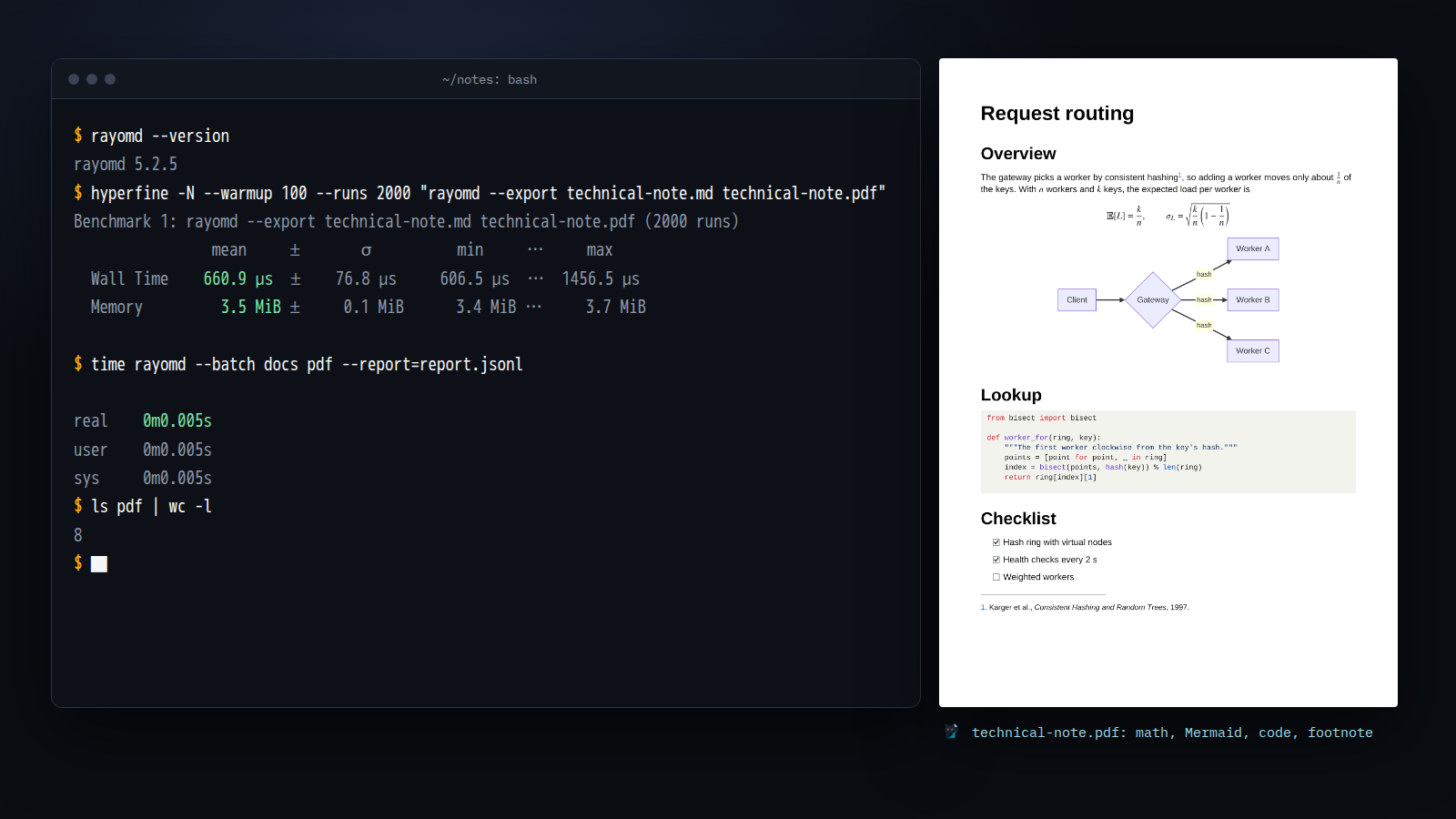
DESCRIPTION
RayoMD converts Markdown to PDF with its own C++17 parser and layout engine and writes the PDF bytes itself: no browser, TeX installation, Pandoc or runtime to install. The Linux download is 727 KB (852 KB for Windows) and the binary needs only libc; the static build needs nothing at all.
Under a millisecond. A note with a formula, a Mermaid flowchart and
highlighted code goes from Markdown to PDF in 0.66 ms, start to exit, as a
fresh process of the static Linux build with 3.5 MiB of peak memory
(hyperfine, 2,000 runs; the screenshot). A running process (--serve,
--batch) exports each further document in 0.16 ms, and one batch writes
eight documents with 100 pages in 5 ms.
The longer tester.md (Unicode text, tables, code, footnotes, formulas) takes
1.34 ms, where Pandoc + Typst took 357 ms, md-to-pdf (Chromium) 1,821 ms and
Pandoc + XeLaTeX 2,147 ms: RayoMD 5.2.5 on an AMD Ryzen 5 PRO 4650GE,
2026-10-20, comparing time to a finished PDF, not identical output.
- GitHub Markdown: tables, task lists, footnotes, alerts, and bookmarks and
#anchorlinks from headings - TeX math typeset natively in embedded fonts; code coloured as on GitHub in 29 languages
- Mermaid flowcharts, sequence diagrams and pie charts drawn as vectors; PNG, JPEG and SVG images
- Tables of contents, numbered headings, page numbers, page sizes, and themes with fonts, colours, headers, footers and a cover
- Books from an mdBook or GitBook
SUMMARY.mdor a folder; Obsidian vaults with callouts, wiki links and embedded notes - Whole folders on up to 64 threads with a JSON Lines report,
--stdin, and a warm--servemode - PDF/A-3b archives and tagged PDF/UA-1, validated with veraPDF; optional reversible PDFs that carry the exact Markdown source
It renders a Markdown subset, not everything Pandoc does: no HTML/CSS layout or LaTeX packages, and unsupported input degrades to readable text instead of failing the export. A desktop app, RayoMD GUI, shows the real PDF as you type.
DETAILS
- Repository
- Butterski/rayomd (2026-11-04)
- Website
butterski.github.io/rayomd-website/
- Author
- Butterski
- License
- Apache-2.0
- Category
- Notes & Documents
- Language
- C++
- Platforms
- Linux, Windows
- Version
- v5.3.0 (2026-11-04)
- Repo Age
- 5 months old
STAR HISTORY
TAGS
SEE ALSO
- Featured in Markdown tools for the terminal
BADGE
✓ Verified. rayomd's README links back to this listing, so it's ranked first in the directory.

COMMENTS
- No comments yet. Be the first.
to comment.
RELATED TOOLS
glow
GoRender markdown on the CLI, with pizzazz! 💅🏻
★ 28KNotes & Documents7 years old
nb
ShellCLI and local web plain text note‑taking, bookmarking, and archiving with linking, tagging, filtering, search, Git versioning & more
★ 8.5KNotes & Documents10 years olddoxx
RustExpose the contents of .docx files without leaving your terminal. Fast, safe, and smart — no Office required!
★ 3.8KNotes & Documents1 year old
basalt
RustTUI Application to manage Obsidian notes directly from the terminal
★ 1.4KNotes & Documents3 years old
bookokrat
RustA terminal EPUB / PDF Book Reader (+djvu)
★ 1.3KNotes & Documents1 year oldtreemd
RustA (TUI/CLI) markdown navigator with tree-based structural navigation.
★ 732Notes & Documents1 year old