leaf
Terminal Markdown previewer — GUI-like experience.
INSTALLATION
$ curl -fsSL https://raw.githubusercontent.com/RivoLink/leaf/main/scripts/install.sh | sh$ irm https://raw.githubusercontent.com/RivoLink/leaf/main/scripts/install.ps1 | iex$ npm install -g @rivolink/leaf$ brew install leaf-markdown-viewer$ cargo install leaf-markdown-viewer$ scoop install leaf-markdown-viewer$ yay -S leaf-markdown-viewer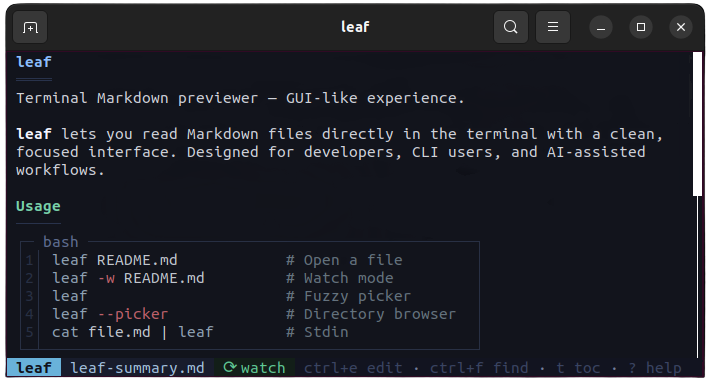
DESCRIPTION
A feature-rich terminal Markdown viewer built with Rust that delivers a GUI-like previewing experience inside your command line.
Supports rich formatting, 40+ language syntax-highlighted code blocks, LaTeX math, ASCII Mermaid diagrams, and YAML frontmatter.
Features interactive navigation with mouse and Vim keybindings, a sidebar Table of Contents, live file watching, fuzzy searching, and seamless editor integration.
DETAILS
- Repository
- rivolink/leaf (2026-11-05)
- Website
leaf.rivolink.mg
- Author
- RivoLink
- License
- MIT
- Category
- Notes & Documents
- Language
- Rust
- Platforms
- Linux, macOS, Windows
- Version
- 1.29.2 (2026-10-25)
- Repo Age
- 7 months old
STAR HISTORY
TAGS
BADGE
Maintain leaf? Add this badge to your README: listings that link back are marked verified and ranked first in the directory. It's checked once a day.

[+] show code[−] hide code
[](https://cli.masoko.net/tools/leaf/)<a href="https://cli.masoko.net/tools/leaf/"><img src="https://cli.masoko.net/badge/leaf.svg" alt="leaf on The Terminal Index"></a>COMMENTS
- No comments yet. Be the first.
to comment.
RELATED TOOLS

wtf
GoThe personal information dashboard for your terminal
★ 17.1KNotes & Documents8 years olddoxx
RustExpose the contents of .docx files without leaving your terminal. Fast, safe, and smart — no Office required!
★ 3.8KNotes & Documents1 year old
frogmouth
PythonA Markdown browser for your terminal
★ 3.3KNotes & Documents3 years oldtreemd
RustA (TUI/CLI) markdown navigator with tree-based structural navigation.
★ 732Notes & Documents1 year oldtsuzuri
GoBlock-based notebook for the terminal. Plain Markdown files, Vim editing, live preview, boards, calendars and 96 themes.
★ 354✓ verifiedNotes & Documents2 months old
lazymark
GoLazy markdown notes, tasks and a Kanban board in your terminal. With a sleepy sloth.
★ 103Notes & Documents1 month old