
procs
A modern replacement for ps written in Rust
INSTALLATION
$ brew install procs$ winget install procs$ sudo dnf install procs$ sudo pacman -S procs$ sudo rpm -i https://github.com/dalance/procs/releases/download/v0.14.12/procs-0.14.12-1.x86_64.rpm$ cargo install procs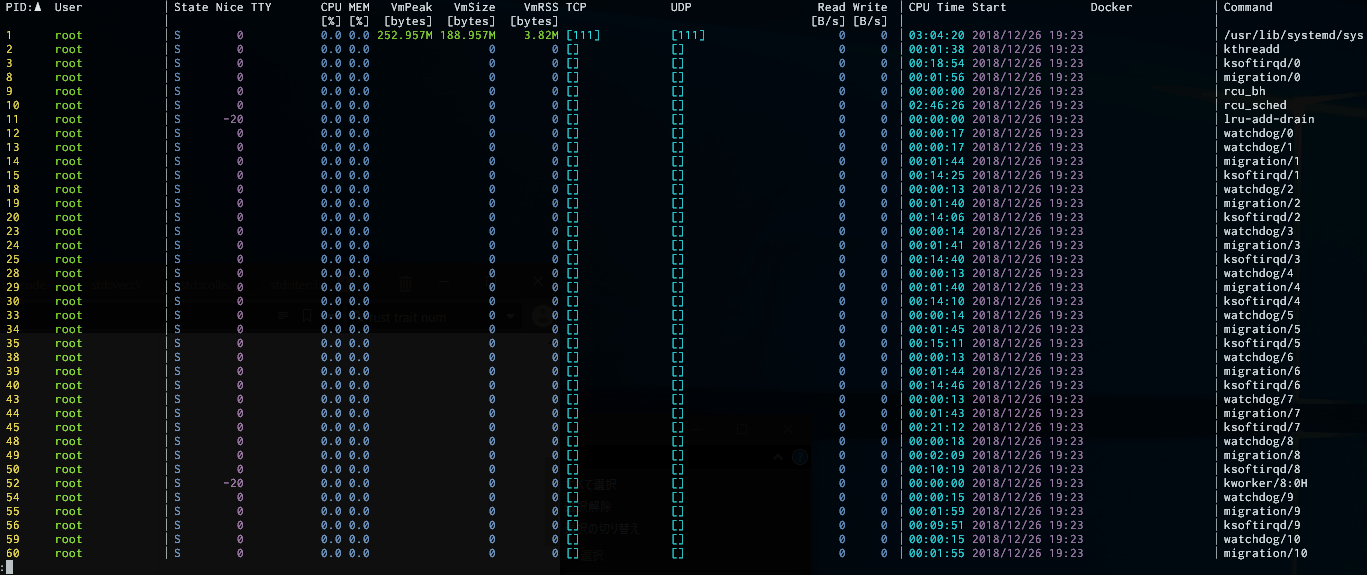
DESCRIPTION
procs is a modern, colorful replacement for the classic Unix ps command written in Rust.
It provides human-readable output, multi-column keyword searching, and process hierarchy tree views out of the box.
Additionally, it surfaces extra data like TCP/UDP ports, I/O throughput, and Docker container names that standard ps omits.
DETAILS
- Repository
- dalance/procs (2026-11-06)
- Author
- dalance
- License
- MIT
- Category
- System Monitoring
- Language
- Rust
- Platforms
- Linux, macOS, Windows
- Version
- v0.14.12 (2026-06-25)
- Repo Age
- 7 years old
STAR HISTORY
TAGS
SEE ALSO
- procs is a modern alternative to top / ps
- Featured in Modern Unix: better versions of classic commands
BADGE
Maintain procs? Add this badge to your README: listings that link back are marked verified and ranked first in the directory. It's checked once a day.

[+] show code[−] hide code
[](https://cli.masoko.net/tools/procs/)<a href="https://cli.masoko.net/tools/procs/"><img src="https://cli.masoko.net/badge/procs.svg" alt="procs on The Terminal Index"></a>COMMENTS
- No comments yet. Be the first.
to comment.
RELATED TOOLS
bottom
RustYet another cross-platform graphical process/system monitor.
★ 14.2KSystem Monitoring7 years old
htop
Chtop - an interactive process viewer
★ 8.4KSystem Monitoring6 years oldabtop
RustLike htop, but for AI coding agents. Monitor Claude Code & Codex CLI sessions, tokens, context window, rate limits, and ports in real-
★ 3.8KSystem Monitoring7 months old
bpftop
Cbpftop provides a dynamic real-time view of running eBPF programs.
★ 2.7KSystem Monitoring2 years old
usbtree
RustLive USB device tree in your terminal. Rust TUI, no root, no libusb. Full activity metrics on Linux; device tree on macOS/Windows.
★ 713System Monitoring4 months old
metropolis
RustA cyberpunk system monitor that transforms kernel metrics into a living terminal skyline.
★ 300System Monitoring7 months old

