
shoal
Terminal LAN discovery that shows its work
INSTALLATION
$ curl -fsSL https://github.com/BT10011/shoal/releases/latest/download/install.sh | sh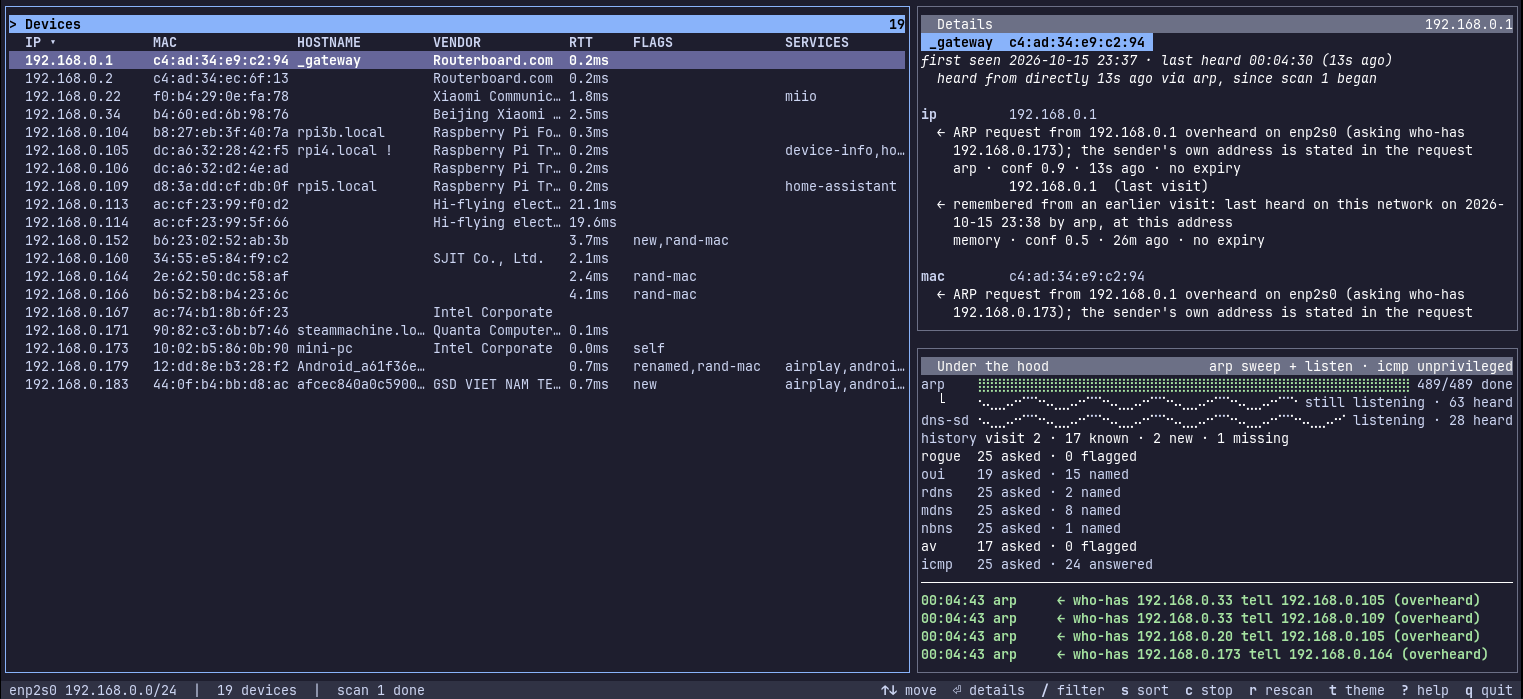
DESCRIPTION
Shoal finds the devices on the network segment you are plugged into and fills in what they are, live: a typical /24 is swept in about seven seconds.
Its defining feature is that every value on screen says how it was learned — which probe found it, what was sent, what came back, how sure it is and when it expires — so it is as much a way to learn how a network is discovered as a way to list what is on one. ARP, DNS, mDNS/Bonjour, NetBIOS and ICMP each know a different part of the picture, and you can watch each one answer as it runs.
DETAILS
- Repository
- BT10011/shoal (2026-10-18)
- Author
- BT10011
- License
- MIT
- Category
- Networking
- Language
- Go
- Platforms
- Linux, macOS
- Version
- v2.0.1 (2026-10-18)
- Repo Age
- 1 month old
STAR HISTORY
TAGS
SEE ALSO
- Featured in Network monitoring in the terminal
BADGE
Maintain shoal? Add this badge to your README: listings that link back are marked verified and ranked first in the directory. It's checked once a day.

[+] show code[−] hide code
[](https://cli.masoko.net/tools/shoal/)<a href="https://cli.masoko.net/tools/shoal/"><img src="https://cli.masoko.net/badge/shoal.svg" alt="shoal on The Terminal Index"></a>COMMENTS
- No comments yet. Be the first.
to comment.
RELATED TOOLS
bandwhich
RustTerminal bandwidth utilization tool
★ 12.1KNetworking7 years old
termshark
GoA terminal UI for tshark, inspired by Wireshark
★ 10.1KNetworking7 years old
trippy
RustTrippy combines the functionality of traceroute and ping and is designed to assist with the analysis of networking issues.
★ 8.2KNetworking4 years oldsshfs
CA network filesystem client to connect to SSH servers
★ 7.8KNetworking10 years oldrustnet
RustPer-process network monitoring for your terminal with deep packet inspection. Cross-platform, sandboxed.
★ 5.2KNetworking1 year old
kyanos
CKyanos is a networking analysis tool using eBPF. It can visualize the time packets spend in the kernel, capture requests/responses ...
★ 5.1KNetworking2 years old


